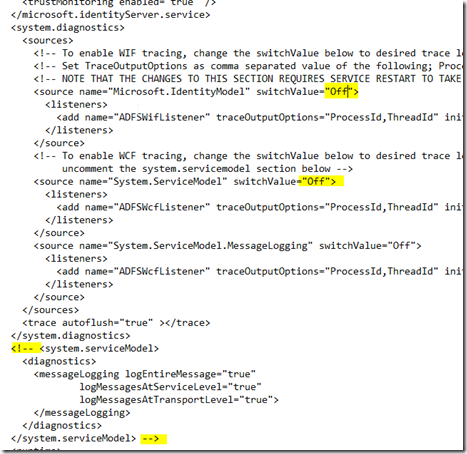
- Run CMD as Administrator- WEVTUTIL sl “AD FS Tracing/Debug” /l:5- Open the file “C:\Windows\ADFS\Microsoft.IdentityServer.Servicehost.exe.config”- Find the following sections shown in the image
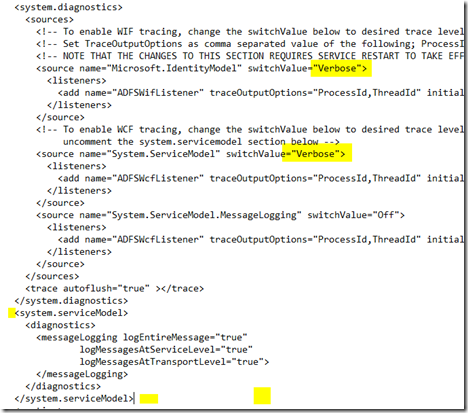
- Update the switchValues for Microsoft.IdentityModel and System.ServiceModel to Verbose instead of Off. Also remove the comments from around the system.serviceModel section.
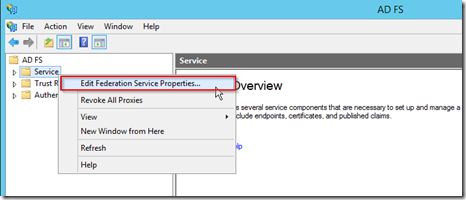
 - Open Event Viewer.- To open Event Viewer, click Start, point to Programs, point to Administrative Tools, and then click Event Viewer.- On the View menu, click Show Analytic and Debug Logs.- In the console tree, expand Applications and Services Logs, expand AD FS Tracing, and then click Debug.- In the Actions pane, click Enable Log.- Tracing for AD FS is now enabled.- Restart the Active Directory FederationServices windows service.- Open the AD FS Management tool- Right click on the Service folder and select Edit Federation Service Properties…
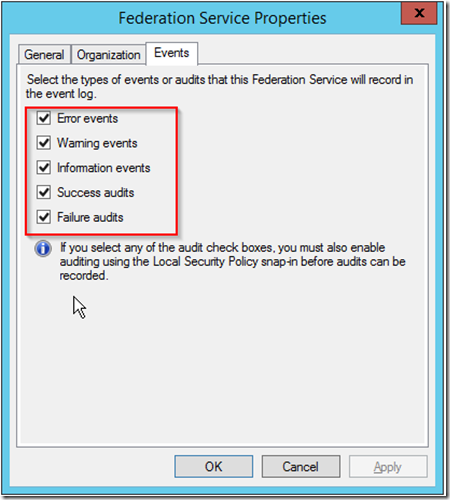
 - Select the Events tab and select all the checkboxes to make sure all errors will be displayed in the event log.
ADFS 2.1 & 3.0 Config Debug Tracing
adfsadfs-2-1adfs-3