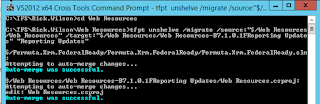
This can be useful if you start working on the wrong branch and need to move your uncommitted code to the correct branch.
Pre-Reqs.
-You will need to have the TFS Power Tools installed.
https://www.microsoft.com/en-us/download/details.aspx?id=35775
-Make sure the path of your command prompt on your project path
eg. c:\TFS\Rick.Wilson\Web Resources
-Get latest on the source and target branches to avoid this error: “Unable to determine the workspace.”
-Create your shelveset and make sure you don’t have any pending changes in either branch to avoid this error: “An item with the same key has already been added”
Instructions
-Shelve your changes
-Open a Visual Studio Command Prompt
-Run the following command
tfpt unshelve /migrate /source:”$/Project/CurrentBranch” /target:”$/Project/NewBranch” “Shelveset Name”
-A shelveset details window will come up, click the Unshelv button.
-Next the Unshelv/Merge window will come up, click the Auto-merg button.
The command prompt will then start showing the merges into the new branch.