
What happened
Recently I was working on data where I needed to pick one best row per group, then merge that result with a lookup table. Here’s the head-scratcher I hit: the pick looked right in preview, but after the merge some groups showed different rows, like the merge had used the pre-pick data. What was happening is that Power Query re-evaluated and re-ordered things during the merge, which changed which row got selected. The fix was to freeze the picked result with Table.Buffer right after the pick so the merge used exactly those rows. I also made the lookup one row per key to avoid duplicate expands. After that, everything stayed stable on refresh.
Why and how Table.Buffer works
Why the drift happens
- Power Query is lazy. It does not materialize intermediate steps until needed.
- A Merge can push work back to the source (folding). That re-evaluation can change row order.
- If your “pick one” depends on order, the selected row can change during the Merge.
What Table.Buffer does
- Takes a snapshot of the current table and caches it in memory.
- Preserves the row order you produced before buffering.
- Acts like a barrier so later steps cannot change that selection.
Where to place it
// After you have exactly the rows and columns you want to keep
KeptCols   = Table.SelectColumns(YourPickedTable, {"GroupKey","ChosenCol1","ChosenCol2","TieBreaker"});
LeftFrozen = Table.Buffer(KeptCols);

// Then do your join
RightOne   = Table.Distinct(RightTable, {"RightKey"});
Merged     = Table.NestedJoin(LeftFrozen, {"GroupKey"}, RightOne, {"RightKey"}, "Right", JoinKind.LeftOuter);
Final      = Table.ExpandTableColumn(Merged, "Right", {"R1","R2"}, {"R1","R2"});
Use it when
- You pick or rank one row per group, then Merge or Append
- Post-merge results do not match the pre-merge preview
- You branch the same picked result to multiple places and need consistency
Cautions
- Holds the data in memory. Avoid on very large tables.
- Steps after the buffer often will not fold back to the source. Use it only where correctness matters.
Demonstration of issue
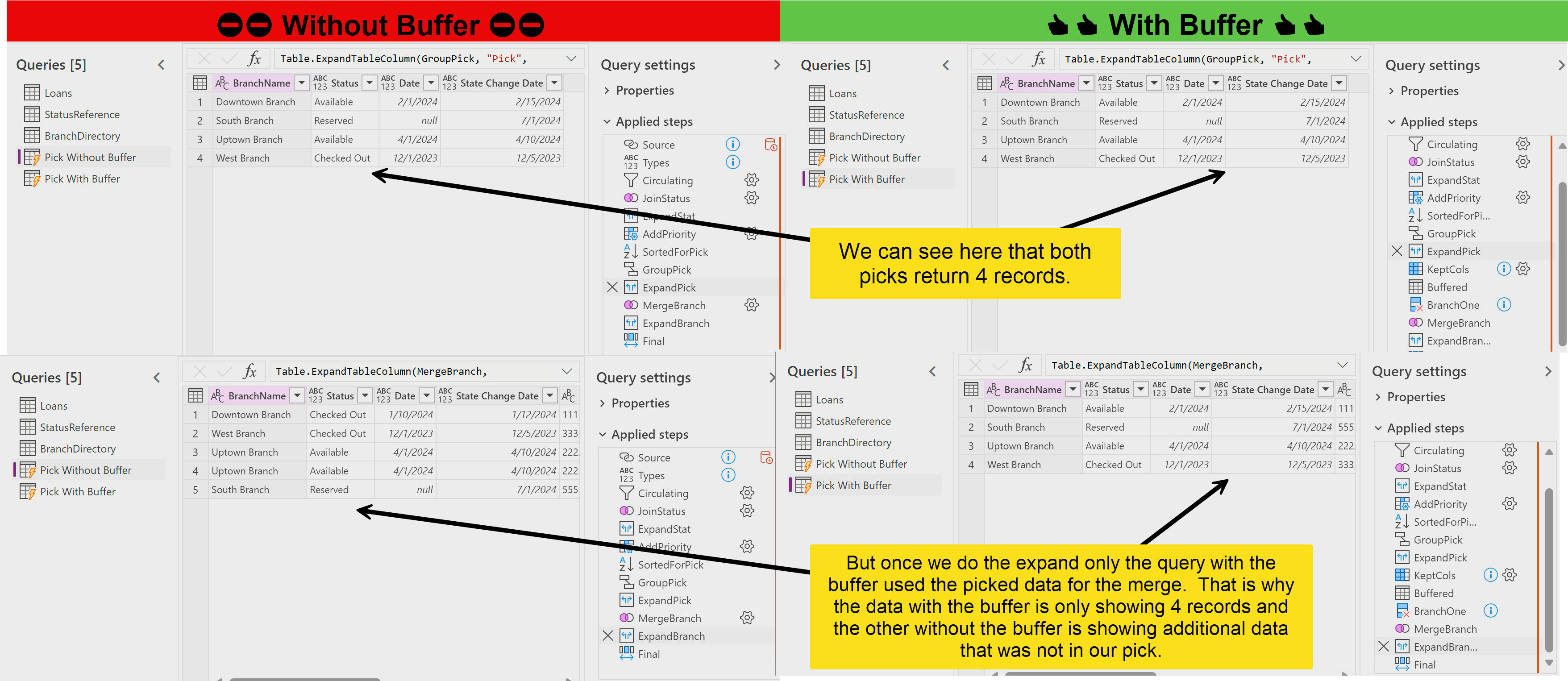
Here is a side-by-side Power Query comparison showing why buffering matters. Both queries “pick” 4 rows before the merge. After the merge, the unbuffered query returns 5 rows and shows a changed pick, while the buffered query returns the expected 4 rows that match the pick.
Reproduce the issue and the fix
Create the three small tables with Enter data
In Power Query, use Home > Enter data, paste each block, check Use first row as headers, click OK. Name them Loans, StatusReference, and BranchDirectory.
Loans
BranchName,Item Type,State,CopyAddedDate,State Change Date,CopyId
Downtown Branch,Circulating,Checked Out,2024-01-10,2024-01-12,CP001
Downtown Branch,Circulating,Available,2024-02-01,2024-02-15,CP002
Uptown Branch,Circulating,Reserved,,2024-03-01,CP010
Uptown Branch,Circulating,Available,2024-04-01,2024-04-10,CP011
West Branch,Circulating,Checked Out,2023-12-01,2023-12-05,CP020
West Branch,Circulating,Lost,2022-05-01,2024-05-10,CP021
Reference Branch,Reference,Available,2024-06-01,2024-06-10,CP030
South Branch,Circulating,Reserved,,2024-07-01,CP040
StatusReference
State,Status,StatusOrder
Available,Available,3
Reserved,Reserved,2
Checked Out,Checked Out,1
Lost,Lost,0
BranchDirectory
(contains a duplicate on purpose)
branch_name,branch_id,branch_current_status,branch_inventory_date
Downtown Branch,11111111-1111-1111-1111-111111111111,Available,2024-02-15
Uptown Branch,22222222-2222-2222-2222-222222222222,Available,2024-04-10
Uptown Branch,22222222-2222-2222-2222-222222222223,Available,2024-04-10
West Branch,33333333-3333-3333-3333-333333333333,Checked Out,2023-12-05
South Branch,55555555-5555-5555-5555-555555555555,Reserved,
Query 1: pick per group, then merge (unbuffered)
let
    Source = Loans,

    Types = Table.TransformColumnTypes(Source, {
        {"BranchName", type text}, {"Item Type", type text}, {"State", type text},
        {"CopyAddedDate", type date}, {"State Change Date", type date}, {"CopyId", type text}}),

    Circulating = Table.SelectRows(Types, each [Item Type] = "Circulating"),

    JoinStatus = Table.NestedJoin(Circulating, {"State"}, StatusReference, {"State"}, "StatusReference", JoinKind.LeftOuter),
    ExpandStat = Table.ExpandTableColumn(JoinStatus, "StatusReference", {"Status","StatusOrder"}, {"Status","StatusOrder"}),

    AddPriority   = Table.AddColumn(ExpandStat, "Priority", each if [Status] = "Available" then 1 else 0, Int64.Type),
    SortedForPick = Table.Sort(AddPriority, {{"BranchName", Order.Ascending}, {"Priority", Order.Descending}, {"StatusOrder", Order.Descending}, {"State Change Date", Order.Descending}}),

    GroupPick  = Table.Group(SortedForPick, {"BranchName"}, {{"Pick", each Table.FirstN(_, 1), type table}}),
    ExpandPick = Table.ExpandTableColumn(GroupPick, "Pick", {"Status","CopyAddedDate","State Change Date"}, {"Status","Date","State Change Date"}),

    MergeBranch  = Table.NestedJoin(ExpandPick, {"BranchName"}, BranchDirectory, {"branch_name"}, "BranchDirectory", JoinKind.LeftOuter),
    ExpandBranch = Table.ExpandTableColumn(MergeBranch, "BranchDirectory", {"branch_id","branch_current_status","branch_inventory_date"}, {"branch_id","branch_current_status","branch_inventory_date"}),

    Final = Table.ReorderColumns(ExpandBranch, {"BranchName","Status","Date","State Change Date","branch_id","branch_current_status","branch_inventory_date"})
in
    Final
What you may see
- Some picked rows change after the merge
- Duplicate rows for a key that appears twice in the right table
Query 2: same logic with Table.Buffer to freeze the pick
let
    Source = Loans,

    Types = Table.TransformColumnTypes(Source, {
        {"BranchName", type text}, {"Item Type", type text}, {"State", type text},
        {"CopyAddedDate", type date}, {"State Change Date", type date}, {"CopyId", type text}}),

    Circulating = Table.SelectRows(Types, each [Item Type] = "Circulating"),

    JoinStatus = Table.NestedJoin(Circulating, {"State"}, StatusReference, {"State"}, "StatusReference", JoinKind.LeftOuter),
    ExpandStat = Table.ExpandTableColumn(JoinStatus, "StatusReference", {"Status","StatusOrder"}, {"Status","StatusOrder"}),

    AddPriority   = Table.AddColumn(ExpandStat, "Priority", each if [Status] = "Available" then 1 else 0, Int64.Type),
    SortedForPick = Table.Sort(AddPriority, {{"BranchName", Order.Ascending}, {"Priority", Order.Descending}, {"StatusOrder", Order.Descending}, {"State Change Date", Order.Descending}}),

    GroupPick  = Table.Group(SortedForPick, {"BranchName"}, {{"Pick", each Table.FirstN(_, 1), type table}}),
    ExpandPick = Table.ExpandTableColumn(GroupPick, "Pick", {"Status","CopyAddedDate","State Change Date"}, {"Status","Date","State Change Date"}),

    // Freeze the left side before merging
    KeptCols = Table.SelectColumns(ExpandPick, {"BranchName","Status","Date","State Change Date"}),
    Buffered = Table.Buffer(KeptCols),

    // Ensure the right side is one row per key
    BranchOne = Table.Distinct(BranchDirectory, {"branch_name"}),

    MergeBranch  = Table.NestedJoin(Buffered, {"BranchName"}, BranchOne, {"branch_name"}, "BranchDirectory", JoinKind.LeftOuter),
    ExpandBranch = Table.ExpandTableColumn(MergeBranch, "BranchDirectory", {"branch_id","branch_current_status","branch_inventory_date"}, {"branch_id","branch_current_status","branch_inventory_date"}),

    Final = Table.ReorderColumns(ExpandBranch, {"BranchName","Status","Date","State Change Date","branch_id","branch_current_status","branch_inventory_date"})
in
    Final
Expected outcome
- Picked rows remain the same before and after the merge
- No duplicate rows after expand when the right side is made distinct