With TMG going the way of the dodo Microsoft has moved much of it’s functionality into Server 2012R2. This includes publishing applications utilizing Windows Authentication and Kerberos Constrained Delegation (KCD). This is done through a combination of a feature called Web Application Proxy and ADFS 3.0.
Requirements
- Windows Server 2012R2- The Web Application Proxy server should be joined to the domain in order to pass KCD tickets. The WAP server actually can be in another domain but it would require additional setup not covered in this article.- The External DNS of CRM should point to the WAP server.- WAP server will need two virtual or physical network cards. One for external communications and one for internal.- The Federation Service URL cannot match the machine name of the AD FS server.
Example Configuration
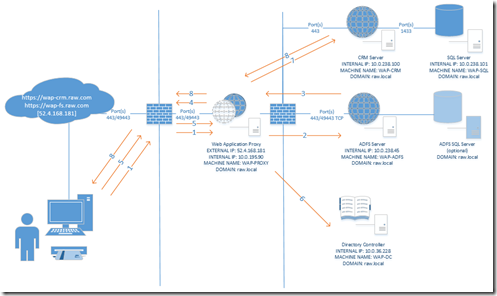
This diagram represents the configuration for our sample environment. Additional setup scenarios for load balancing the WAP and CRM server are possible but not covered in this setup guide.
Firewall Considerations
If your domain controller (DC) and your Web Application Proxy will be separated by a firewall you will need to establish Active Directory and Kerberos communication between them. In order to do this you will need the following port rules.
Ports required for Active Directory communication and Kerberos
| Port/Transport | Protocol |
| 443/TCP | HTTPS |
| 389/TCP | LDAP to Directory Service |
| 389/UDP | |
| 3268/TCP | LDAP to Global Catalog Server |
| 88/TCP | Kerberos Authentication |
| 88/UDP |
DNS Setup
The setting below describe the DNS setup using the sample setup diagram.
External DNS
All the external DNS records should point to your Web Application Proxy external IP
| URL | IP | Usage |
| https://wap-crm.raw.com | 52.4.168.181 | CRM Website |
| https://wap-fs.raw.com | 52.4.168.181 | AD FS Proxy Website |
Internal DNS
If your WAP server will have access to internal DNS records and you have the ability to Add forward lookup zones you can utilize that within your domain DNS. Otherwise you will need to utilize the host file on the WAP machine in order to ensure that it knows the internal IP address mappings for the external Urls.
WAP with DNS Access
In this scenario our WAP server has access to our internal DNS system. We will add a forward lookup zone for our external domain name and add the two external URLs as A records pointing to the internal IP address for those machines.
WAP with No DNS Access Utilizing host File
In this scenario our WAP machine is located in a DMZ with no access to our internal DNS system. The screenshot below shows the host file update we have made to point the external URLs to the internal IP addresses.
Configure CRM Server
In order for Kerberos Constrained Delegation to work correctly we must ensure that Kerberos is functioning correctly in CRM. The following will demonstrate a basic Kerberos setup for a single CRM server.
CRM Application Pool User
Your CRM environment should be using a domain user to run the Application Pool for CRM. We will first determine what user is running the application pool.
- Open the IIS Management Console- Expand the server node and select Application Pools- Make note of the user running the CRMAppPool
Kernel Mode Authentication and Authentication Providers
If kernel mode authentication is being used additional setting will need to be configured to ensure that the application pool user account is being used when Kerberos tickets are issued. Additionally make sure that the providers for windows authentication are utilizing Kerberos (Negotiate).
Set Kernel Mode Authentication
- Open the IIS Management Console- Expand the server node and the Sites node- Click on the Microsoft Dynamics CRM website- Double click on Authentication in the Feature View area- Select Windows Authentication in the Features View area- Click Advanced Settings… in the Actions area- Ensure that Enable Kernel-mode authentication is checked and click Ok or Cancel if it was already checked
Check Authentication Providers
- Open the IIS Management Console- Expand the server node and the Sites node- Click on the Microsoft Dynamics CRM website- Double click on Authentication in the Feature View area- Select Windows Authentication in the Features View area and click the Providers… link in the Actions menu.- The providers window should have Negotiate listed as the first provider- Note: If Negotiate is not listed you can add it from the Available Providers drop down. Additional if any provider is listed above Negotiate use the Move Up and Move Down buttons to ensure Negotiate is listed as the first provider.
Use Application Pool Credentials
Because we are using kernel mode authentication CRM will attempt to get Kerberos tickets utilizing a build in service account. The service account IIS will user for Kerberos is not delegated to pass the tickets. In order to fix this issue settings will need to be adjusted on the CRM website to ensure the application pool user we identified earlier who is delegated for Kerberos will attempt to get the tickets.
- Open the IIS Management Console- Expand the server node and the Sites node- Click on the Microsoft Dynamics CRM website- Double click on Configuration Editor in the Feature View area- Change the section area to System.webServer/security/authentication/windowsAuthentication- Update the authPersisNonNTLM and useAppPoolCredentials to True- Click the Apply button in the Actions area
Configure Domain Controller
Install DoD Certificates
The instructions illustrated here may differ from internal processes for installing certificates within your organization.
- Download and complete the setup for InstallRoot 4.1
x64 - http://iasecontent.disa.mil/pki-pke/InstallRoot_4.1x64.msi
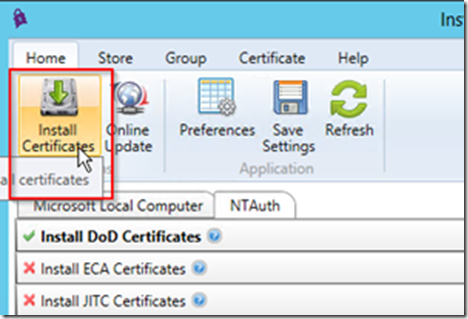
x32 - http://iasecontent.disa.mil/pki-pke/InstallRoot_4.1x32.msi- Run InstallRoot- Click the red checkbox next to Install DoD Certificates so that it turns into a green checkmark- Choose Install Certificates from the Actions Menu
Install Certificates into NTAuth Store
In order for Smart Cards (PKI) to work correctly within our domain the certificates at the root of the smart card must be installed at the Active Directory level. The instructions illustrated here may differ from internal processes for installing certificates within your organization.
- Run InstallRoot- Make sure you have already installed the DoD Certificates- Click on the Store tab- Click on the Active Directory NTAuth button in the ribbon
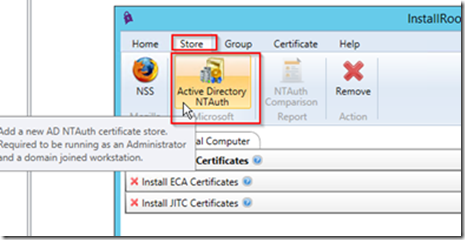 - Click ok when prompted- Go back to the Home tab and select Install Certificates
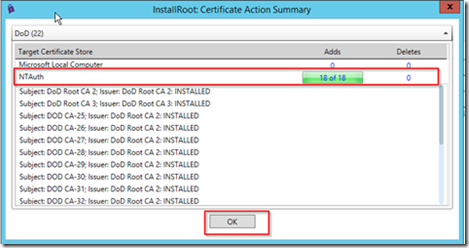
 - InstallRoot will install the necessary certificates into the NTAuth store, click Ok when complete
 - Leave InstallRoot open- Open a command prompt- Run the command gpupdate /force
Note: This will update the local NTAuth store with that of the one you just updated- Go back to InstallRoot and click on the Store tab- Click on the NTAuth Comparison report button
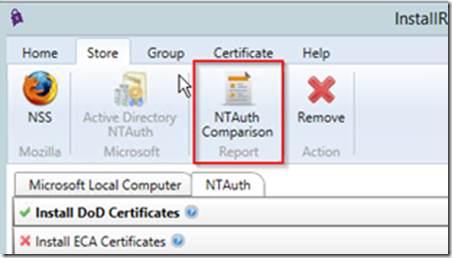 - The Report should show that both Active Directory and the Local store both have the DoD certificates installed, click Ok when you have verified the certificate installation


Push Certificates Using Group Policy
In order to avoid having to install the DoD certificates on all machines utilize group policy to push the certificates down to all servers within the domain.
Export Certificates from Local Store
In order to import the certificates into the group policy object we first need to export the certificates from the local store.
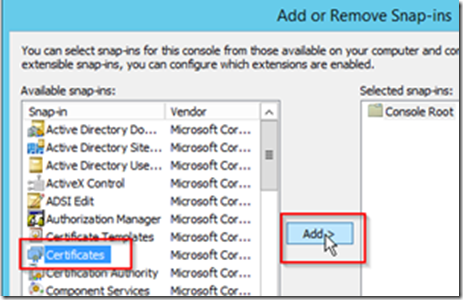
- Open an MMC console- Choose Add/Remove Snap-in… from the File menu- Click Certificates and click Add >
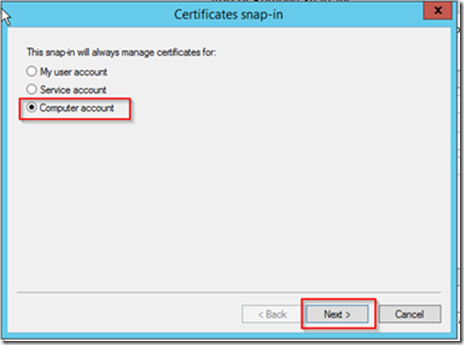
 - Choose Computer account and click Next
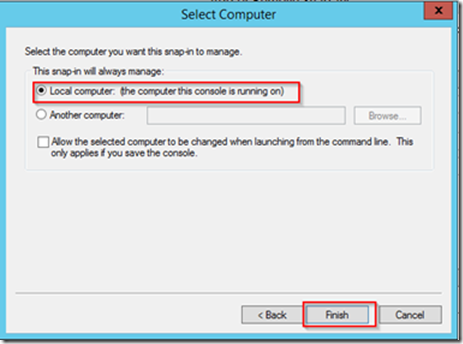
 - Choose Local Computer and click Finish
 - Expand the Trusted Root Certification Authorities and select the Certificates folder- Select the two DoD Root CA certificates
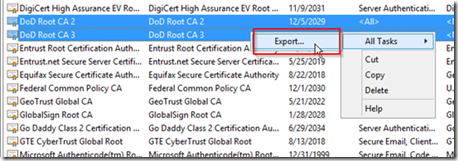
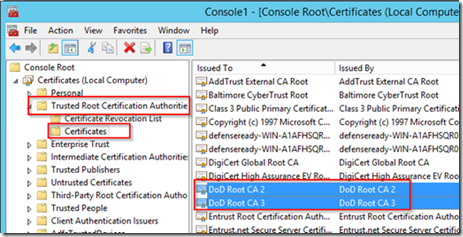 - Right click on the two certificates and choose All Tasks -> Export…
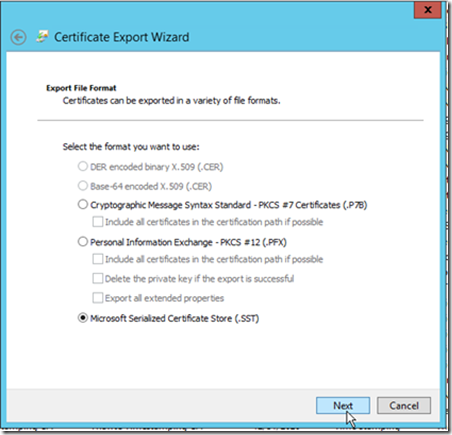
 - Click Next on the first page of the Certificate Export Wizard- On the file format window choose Microsoft Serialized Certificate Store (.SST) and click Next
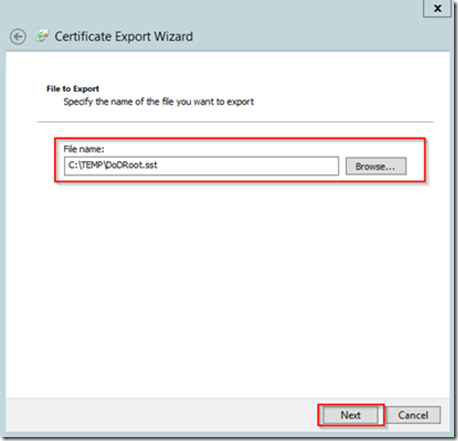
 - Choose a location and File name for the certificate file and click Next
 - Click Finish on the Completing the Certificate Export Wizard- Expand the Intermediate Certification Authorities and select the Certificates folder- Select all of the DOD certificates
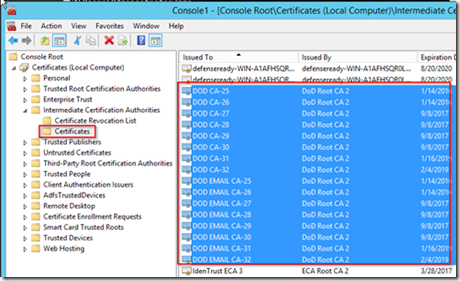 - Right click on the selected certificates and select All Tasks -> Export…
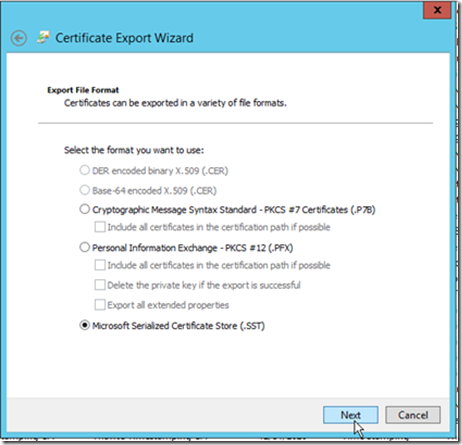
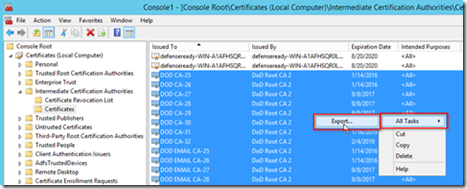 - Click Next on the first page of the Certificate Export Wizard- On the file format window choose Microsoft Serialized Certificate Store (.SST) and click Next
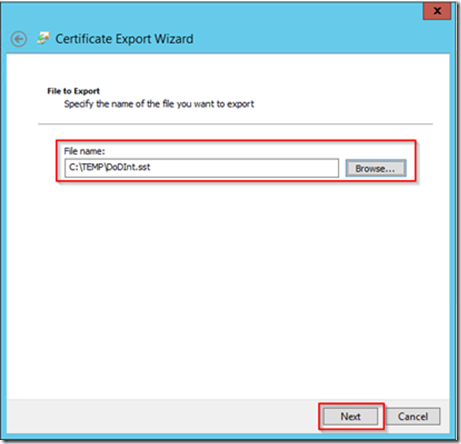
 - Choose a location and File name for the certificate file and click Next
 - Click Finish on the Completing the Certificate Export Wizard


Import Certificates into Group Policy Object
-
Open the Group Policy Management snap-in- Expand Domains and expand your domain- Expand the Group Policy Objects container- Right click on the Default Domain Policy and select Edit…- Within the Group Policy Management Editor navigate to Computer Configuration -> Policies -> Window Settings -> Security Settings -> Public Key Policies
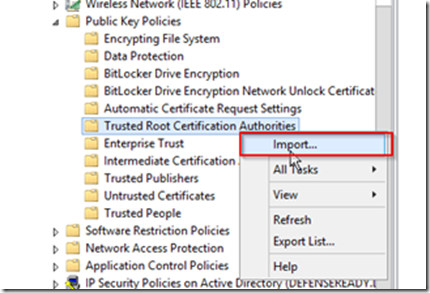
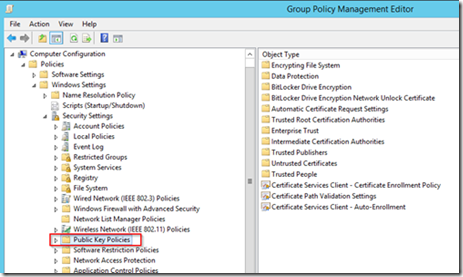 - Expand Public Key Policies and Select the Trusted Root Certification Authorities- Right click on the Trusted Root Certification Authorities folder and select Import…
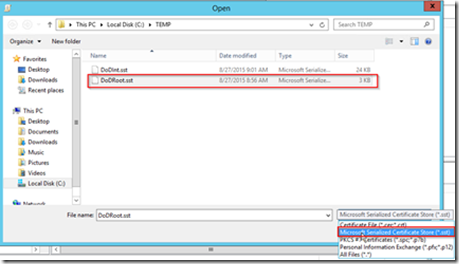
 - Click Next on the Welcome to the Certificate Import Wizard- Click Browse on the File to Import page- On the Open file dialog change the file type lookup to Microsoft Serialized Certificate Store (*.sst) and choose the DoD Root certificate sst you created earlier
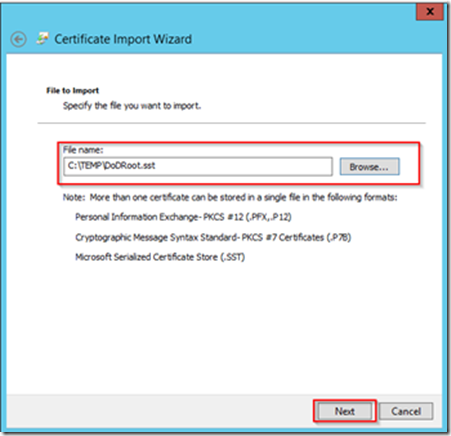
 - After selecting the file click Next on the File to Import page
 - The certificate store will have the Trusted Root Certification Authorities selected by default, click the Next button
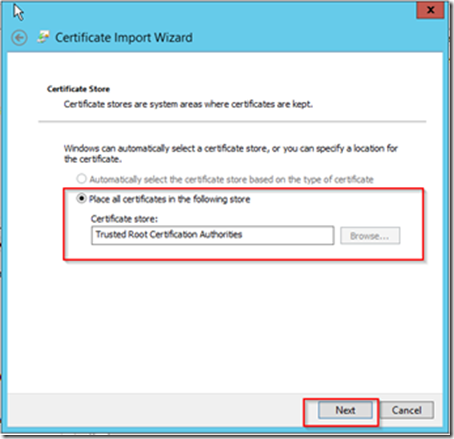 - Click the Finish button on the Completing the Certificate Import Wizard- Under the Public Key Policies click the Intermediate Certification Authorities folder- Right click on the Intermediate Certification Authorities folder and select Import…
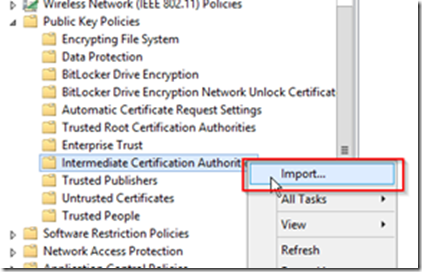 - Click Next on the Welcome to the Certificate Import Wizard- Click Browse on the File to Import page- On the Open file dialog change the file type lookup to Microsoft Serialized Certificate Store (*.sst) and choose the DoD Root certificate sst you created earlier
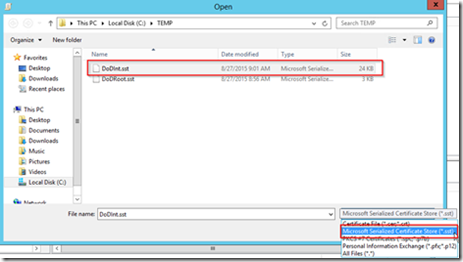 - After selecting the file click Next on the File to Import page
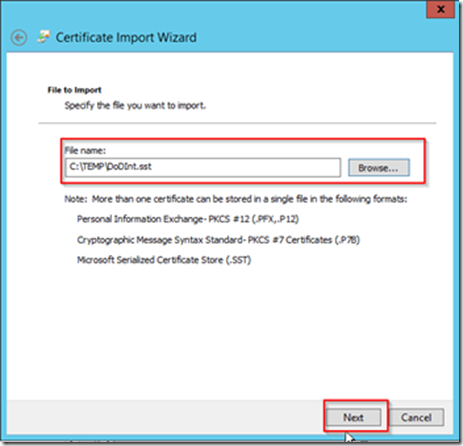 - The certificate store will have the Intermediate Certification Authorities selected by default, click the Next button
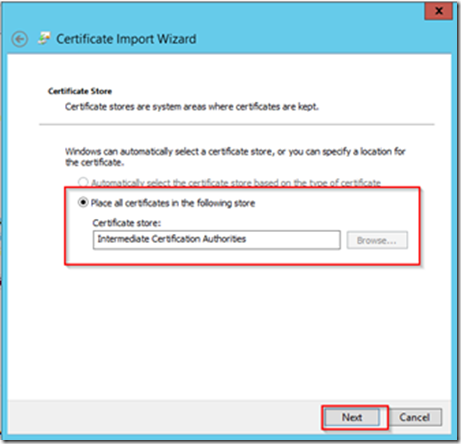 - Click the Finish button on the Completing the Certificate Import Wizard- In order to make sure all the other machines receive these certificates you should log into all other boxes, open a command prompt, and run the following command;
gpupdate /force [](https://blogger.googleusercontent.com/img/b/R29vZ2xl/AVvXsEiflyOfoMUo881zH-EnBPyX0eUDQsDUj5wXIjkOC_N5C-biBMV7HArPyGd4KFy6JCo2HfJxydGFtRoZb7KUNW9jXhHo_VhaYOzPngj9Hz9gN_Nrp2sqygAnFrUEj8LFrErUdQ5lpVmHT3c/s1600-h/image%25255B102%25255D.png)


Create SPN Records for CRM
In order for Kerberos to work correctly Service Principal Name (SPN) records must be set for CRM.
Log in to any machine on the domain using an account with Domain Administrative rights.
-
Open a command window- Set the SPN for the FDDN of the server name
setspn –s http/wap-crm.raw.local wilson\svccrm
-
The command will check for any existing SPN with the same name and then create the SPN- Set the SPN for the NetBIOS name of the server
setspn –s http/wap-crm wilson\svccrm
-
The command will check for any existing SPN with the same name and then create the SPN- Set the SPN for the external DNS name of the CRM website
setspn –s http/wap-crm.raw.com wilson\svccrm
- The command will check for any existing SPN with the same name and then create the SPN
-
-
Set Delegation for CRM
In order for the WAP server to obtain a Kerberos ticket we must allow connection from the WAP server to delegate using the CRM SPNs we set earlier.
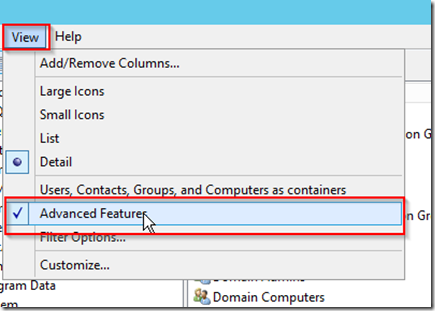
- Open the Active Directory Users and Computers snap-in- Click on View in the toolbar and select Advanced Features
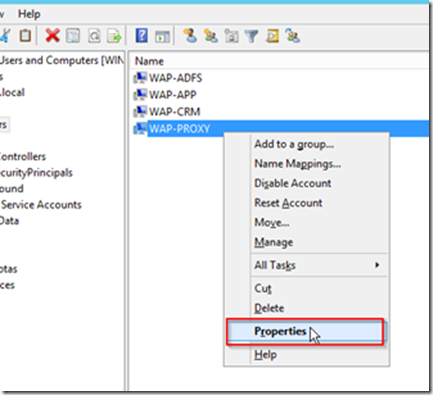
 - Find the entry for the WAP-PROXY computer, right click and choose Properties
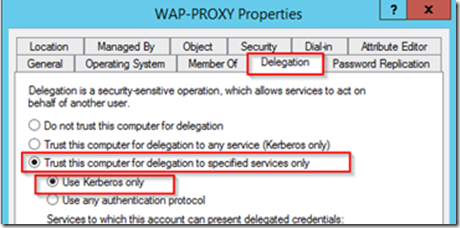
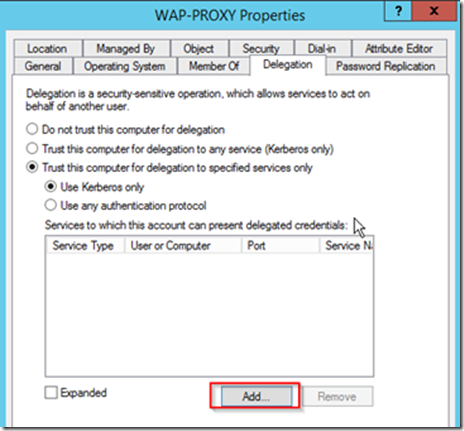
 - On the Properties window click the Delegation tab- Choose the option for Trust this computer for delegation to specified services only- Choose the option for Use Kerberos Only
 - Click the Add button
 - Click Users or Computers
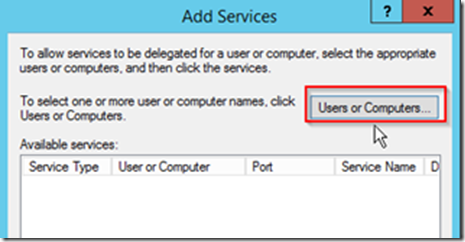 - Enter the service account running the CRM application pool and click OK- On the Add Services window click Select All and then OK- Click the Expanded checkbox on the Delegation tab and all three of the SPNs added earlier will appear- Click OK to exit the properties for the WAP server


Configure Users for KCD
In order for KCD to translate the client certificate to an Active Directory account we must update the userPrincipalName for the users within AD to match that of their CAC certificates.
- Open the Active Directory User and Computers snap-in- In the View menu make sure Advanced Features is checked- Right click on a user account and select Properties- Open the Attribute Editor tab, navigate to userPrincipalName and click Edit- Enter the DoD ID Number for the users CAC card followed by @mil and click OK- Click OK on the user properties window
Configure AD FS Server
Install Certificate
In this step we will be installing the certificate for the Federation Service URL.
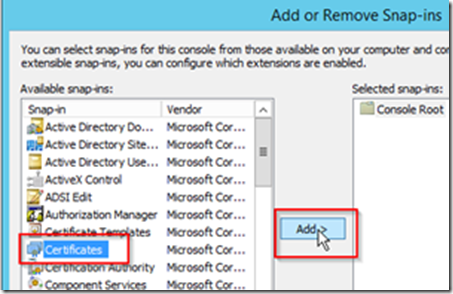
- Copy the certificate to the AD FS server- Open an MMC console- Choose Add/Remove Snap-in… from the File menu- Click Certificates and click Add >
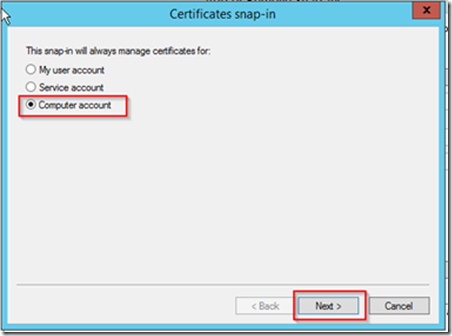
 - Choose Computer account and click Next
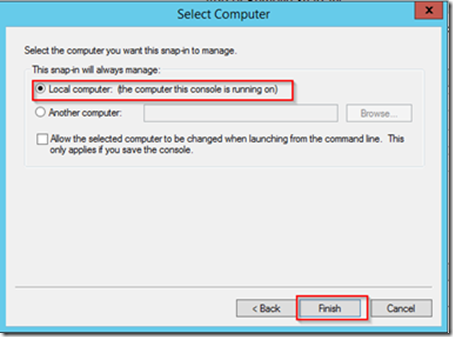
 - Choose Local Computer and click Finish
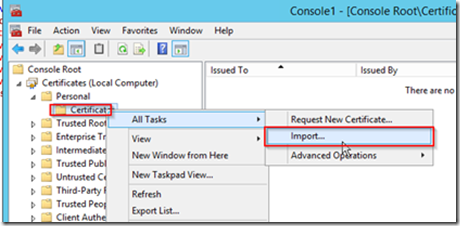
 - Expand the Personal folder and select the Certificates folder- Right click on the Certificates folder and select All Tasks -> Import…
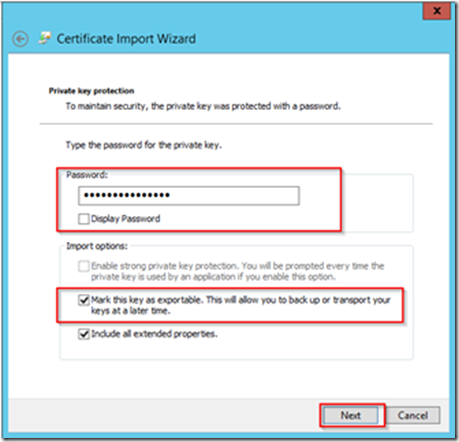
 - Choose the certificate for your external URL and click Next- Enter the password for the private key and also mark this key as exportable then click Next
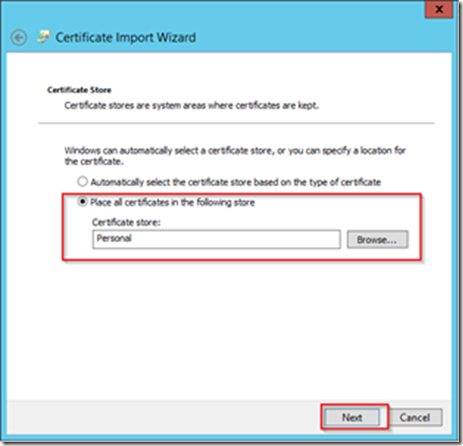
 - Leave the default store of Personal on the Certificate Store page and click Next
 - Click the Finish button


Add Roles and Features
Using the Add Roles and Features Wizard we will add the AD FS role.
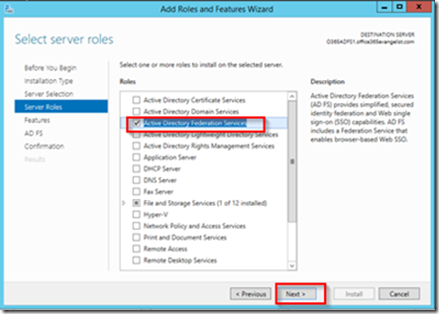
- Login into WAP-ADFS with an account having Active Directory domain administrator permissions.- Open the Add Roles and Features Wizard and click next until you get to the Server Roles page- On the Server Roles page select the Active Directory Federation Services role and click Next
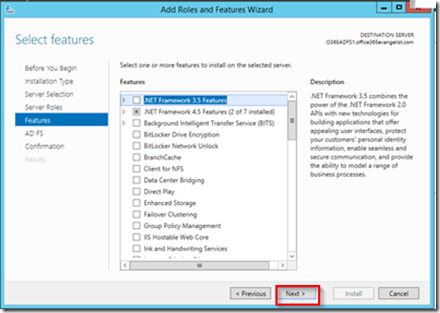
 - Click Next on the Features page
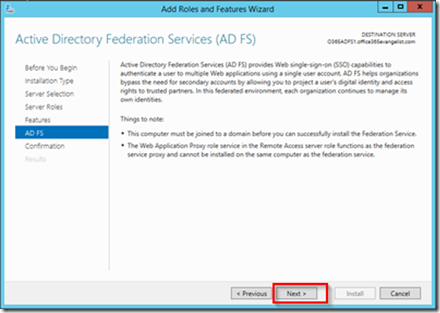
 - Click Next on the AD FS page
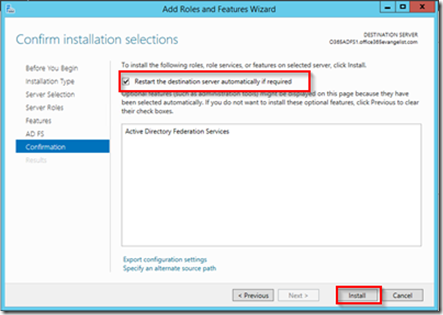
 - Check the Restart the destination server automatically if required check box on the Confirmation page and click Install
 - The install will begin and the server will reboot when completed- After the server has rebooted continue the configuration for the AD FS service
 - Since this is the first AD FS server in the environment we will be leaving the default option and clicking Next on the Welcome screen
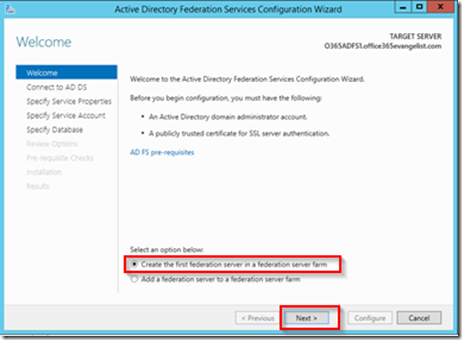 - On the Connect to AD DS page you can leave the current user selected if you logged in with a user who has Active Directory administrative rights, otherwise change it to a user who does. (this account will only be used for setup purposed and will not be used to run the AD FS services.)- Select the public certificate you installed earlier and enter the federation service name which should match the name on the certificate. You can enter whatever you like for the Federation Service Display Name- On the Specify Service Account page you can create a new managed service account. This account will be given all the rights it needs to run AD FS- On the Specify Database page select the Create a database on this server using Windows Internal Database if this will be the only AD FS machine within the network. Otherwise if you plan on having multiple AD FS machine you will need to specify a SQL server to host the database, this is not covered in this guide. Click Next
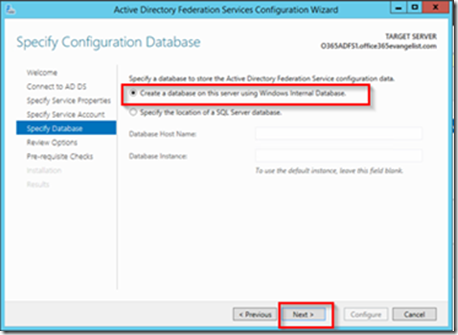 - On the Review Options page click the next button- After the Pre-requisites check has completed click Configure
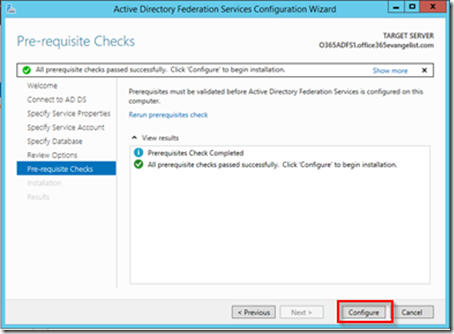 - The installation will begin
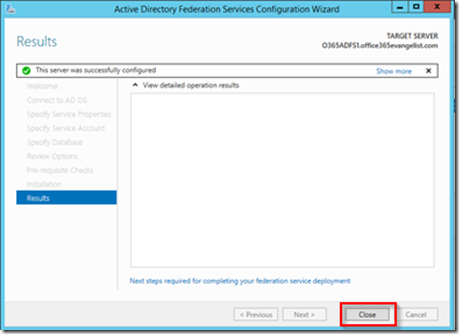
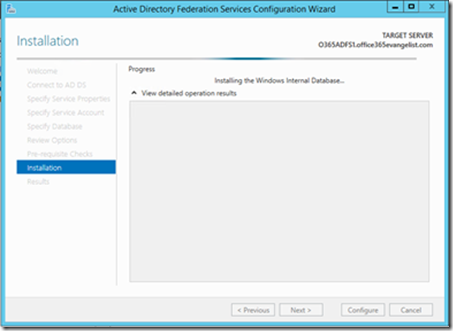 - After the installation has completed click Close


Add CRM as Non-Claims Aware Relying Party
- Open the AD FS Management snap-in- Expand Trust Relationships and select the Relying Party Trusts folder- Click Add Non-Claims-Aware Relying Party Trust… in the Actions menu
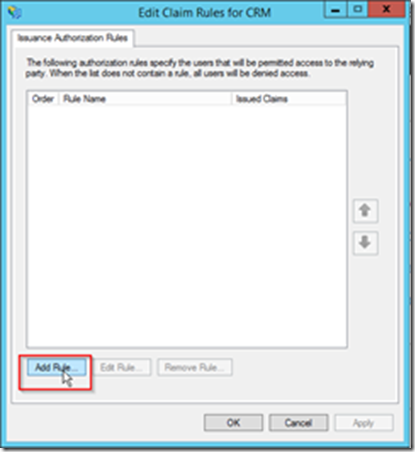
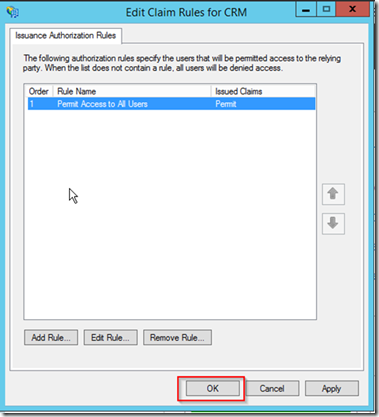
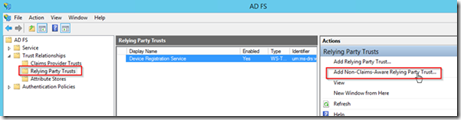 - Click Start button on the Welcome screen- Enter any display name you like and click the Next button- Enter the external URL of the CRM website and click the Add button- Click the Next button- Leave the default values for not configuring multi-factor authentication and click Next- Click Next on the Ready to Add Trust page- Make sure the Open the Edit Issuance Authority Rules dialog checkbox is checked and select Close- On the Edit Claims Rule dialog click the Add Rule… button
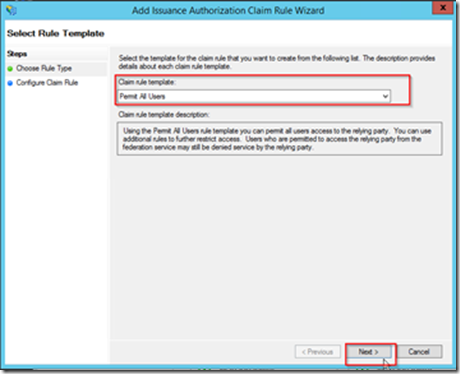
 - In the Claim rule template select Permit All Users and click Next
 - Click Finish- Click Ok on the Edit Claim Rules for CRM Dialog


Update Authentication Policy
In order to accept only client certificates updates will be completed on the global AD FS authentication settings.
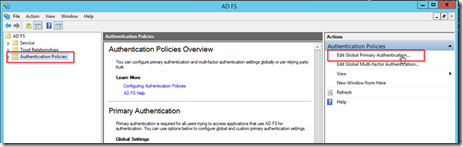
- Open the AD FS Management snap-in- Click on the Authentication Policies folder- Click on Edit Global Primary Authentication.. in the Actions menu
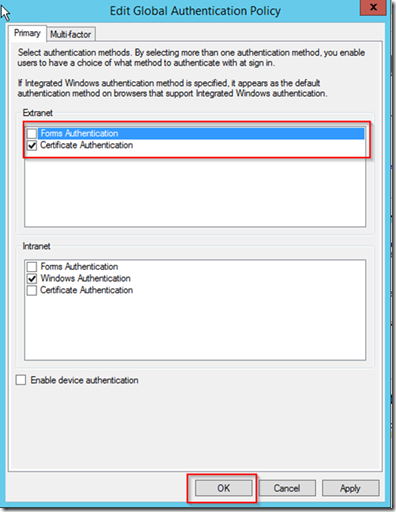
 - In the Extranet settings un-check Forms Authentication and check Certificate Authentication, then click OK


Test AD FS Service
This will test if the AD FS server is running and processing requests
- Open browser on AD FS server- Enter the following URL, https://wap-fs.raw.com/adfs/fs/federationserverservice.asmx
Note: make sure to replace wap-fs.raw.com with your federation service url- The browser should show and XML response from the server
Configure WAP Server
Add Roles and Features
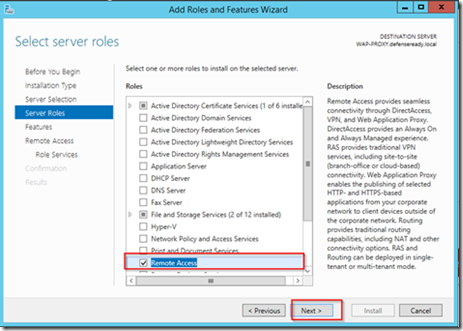
- Open the Add Roles and Features Wizard and click next until you get to the Server Roles page- On the Server Roles page select the Remote Access role and click Next
 - Click Next on the Features screen- On the Role Services page for Remote Access choose Web Application Proxy
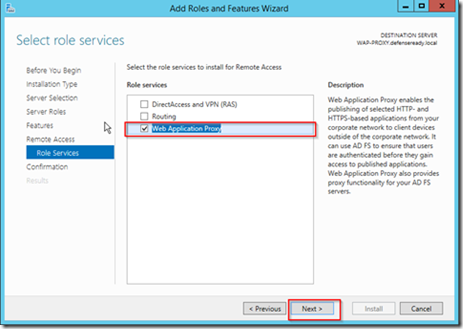 - Click Add features if prompted to add additional Remote Server Administration Tools
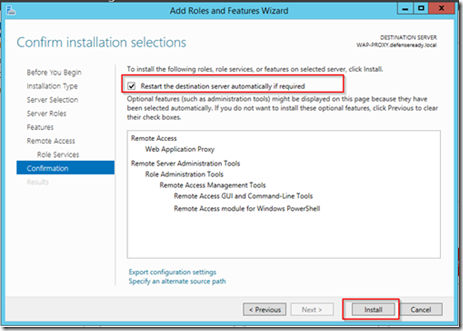
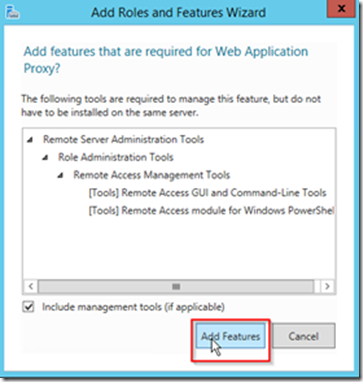 - Click Next on the Select role services window- On the Confirm installation selections page check the Restart the destination server automatically checkbox and click Install


Install Certificates
The WAP server will be the forward facing server that clients will be hitting, because of this any certificate which will be used for external URLs will need to be installed on this machine. These certificates should contain the private key.
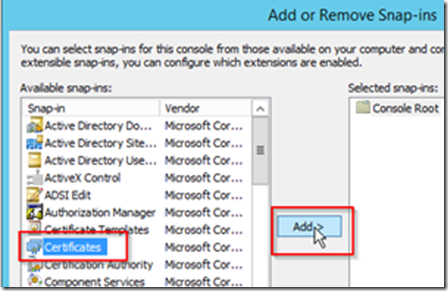
- Open an MMC console- Choose Add/Remove Snap-in… from the File menu- Click Certificates and click Add >
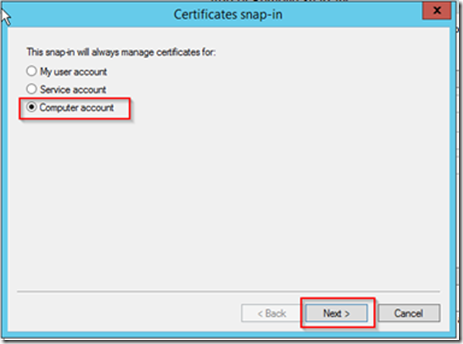
 - Choose Computer account and click Next
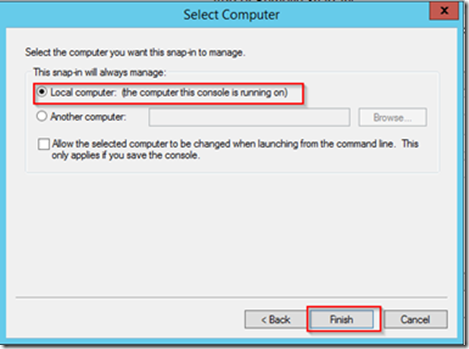
 - Choose Local Computer and click Finish
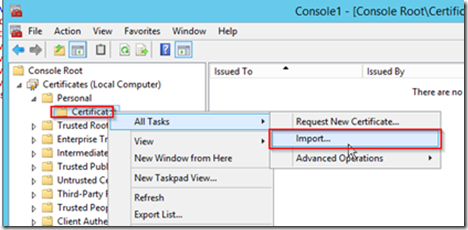
 - Expand the Personal folder and select the Certificates folder- Right click on the Certificates folder and select All Tasks -> Import…
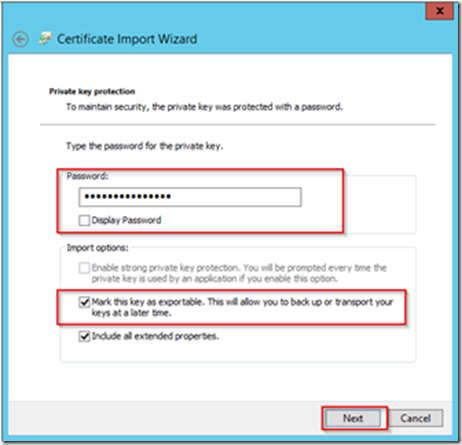
 - Choose the certificate for your external URL and click Next- Enter the password for the private key and also mark this key as exportable then click Next
 - Leave the default store of Personal on the Certificate Store page and click Next
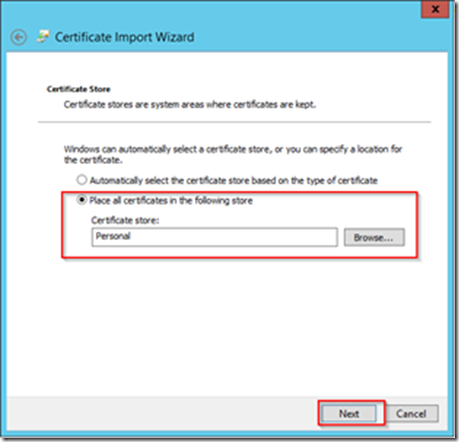 - Click the Finish button


DNS Host File Entry
Based upon our sample setup our WAP server is located in a DMZ without access to the internal DNS server. Because of this we will be using host file entries to map the external URLs from the WAP machine to the internal address of the machines actually hosting the services.
- Open Explorer and navigate to C:\Windows\System32\drivers\etc
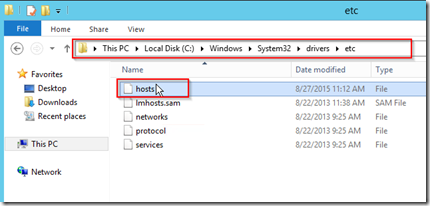 - Open the hosts file using notepad- Create entries for the two internal machines which will be hosting AD FS and CRM and the external URLs which are going to be used

Configure WAP
- Open the Web Application Proxy Wizard configuration
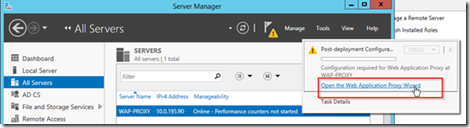 - On the Welcome screen click Next- Enter the federation service name you used during the AD FS setup and enter the information for a local service account on the ADFS box that has local administrative rights- Select the certificate which is also being used by the AD FS service- On the confirmation page click Configure- After the configuration has completed click Close- After configuration the Remote Access Management Console will be displayed
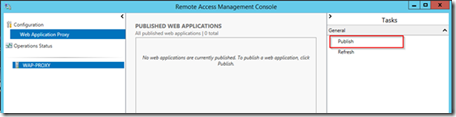
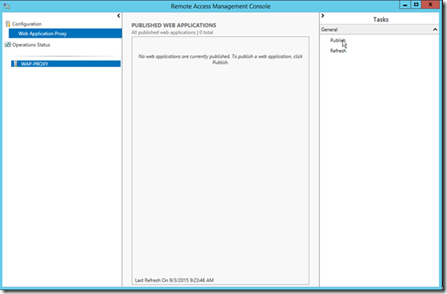 - Select Publish from the Tasks menu
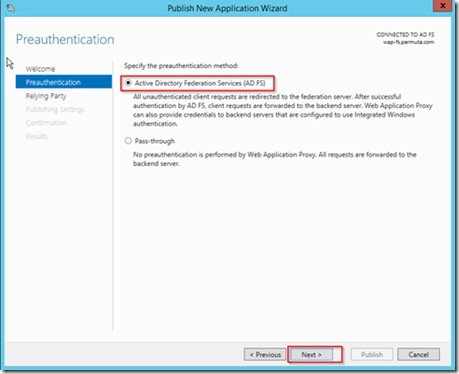
 - On the Welcome Screen click Next- Choose Active Directory Federation Service as the pre-authentication method and click Next
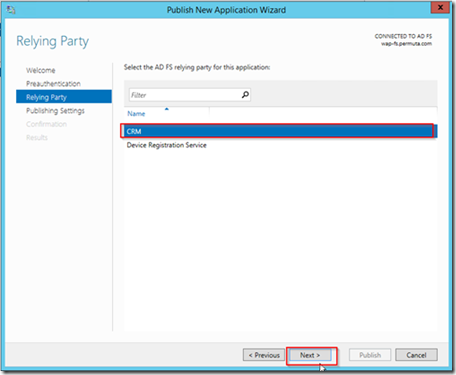
 - Select the Relaying Party we created during the AD FS setup for CRM and click Next
 - Enter information for the published website. The name can be whatever you like- On the Confirmation screen click Publish- After the web application has been published click Close


Client Certificate Revocation (Development Environment)
On a production environment Tumbleweed or another service providing CRL should be installed and configured. Within a development environment where Tumbleweed is not available disabling CRL checking can be done to allow for testing. Disabling CRL checking is not something you would ever want to do in a production environment since it would negate much of the security that certificates provide.
-
Log into the Web Application Proxy machine- Open a command window and enter the following command and press Enter
netsh http show sslcert
-
Find the Hostname:port entry ending in 49443- Run the following command, replace << Hostname:port >> with the Hostname:port value from your environment
netsh http delete sslcert hostnameport=<>
-
Run the following command, replace all << >> with the related items from your system
netsh http add sslcert hostnameport=<> certhash=<> appid=<> certstorename=My verifyclientcertrevocation=disable ClientCertNegotiation=enable
-
-