<#
.SYNOPSIS
 Turn on meeting recording and transcription for entire organization

.PREREQUISITES
 Download the Skype for Business Online Connector Module - https://www.microsoft.com/en-us/download/details.aspx?id=39366

.ADDITIONAL RESOURCES
 Teams cloud meeting recording - https://docs.microsoft.com/en-us/microsoftteams/cloud-recording
 Manage Skype for Business Online with Office 365 PowerShell - https://docs.microsoft.com/en-us/office365/enterprise/powershell/manage-skype-for-business-online-with-office-365-powershell
#>

Import-Module SkypeOnlineConnector

# Update this to a user who is a Teams Administrator
$userName="admin@test.onmicrosoft.com"
$message = "Please Login Using Your Office 365 Credentials"
$credentials = Get-Credential -UserName $userName -Message $message
$TeamsSession = New-CsOnlineSession -Credential $credentials
Import-PSSession $TeamsSession
# Turns on recording and transcription for everyone withing the organization
Set-CsTeamsMeetingPolicy -Identity Global -AllowCloudRecording $true -AllowTranscription $true
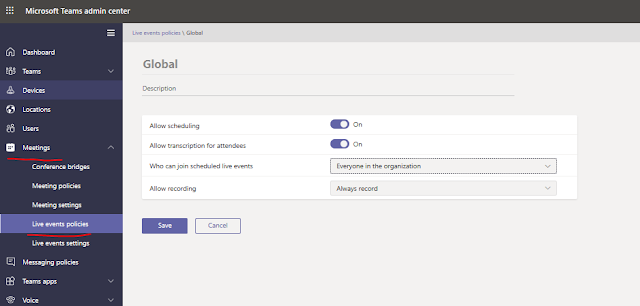
These settings can also be updated using the Teams Admin website.