When working through App In A Day Workshop I wanted to improve the Approval flow to move the Business Process Flow (BPF) Stage forward if the Device Order was Approved. I have utilized plugins and workflow previously to accomplish this type of action but never with Flow. After doing a quick search i found an article from Elaiza Benitez (Automatically update the stage of a Business Process Flow with Flow 2.0), make sure to check it out it’s great. My post here utilizes the techniques Elaiza provided but applies it to the Device Approval Request Flow as part of the App In A Day workshop.
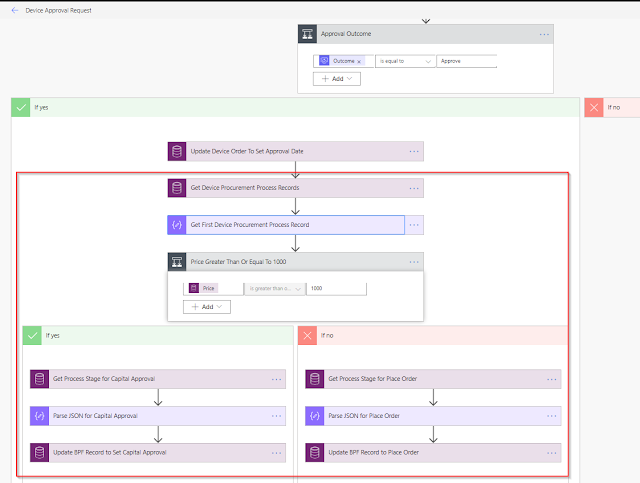
Below if the final Device Approval Request. The parts I added to the BPF are outlined in Red.
The first thing we need to do is get the Device Procurement Process record for the Device Order that applies to the BPF we build in the workshop.

Next we need to parse the returned record using the Parse JSON action. In order to get the schema for this action just run the Flow with the previous action that returns the Device Procurement Process records and grab the Output. Click the Use sample payload to generate schema link copy in the value portion of the output, make sure to not include the [ ].
first(outputs(‘Get_Device_Procurement_Process_Records’)?[‘body/value’])

| Device Procurement Process Records Output |
I wanted to make sure to follow the same rules as the BPF so next the price of the device needs to be evaluated.
 ’
’
If the device is $1000 or greater the first thing to do is to grab the Process Stage information for Capital Approval since that will be required. We will use this process stage information in the next action to actually update the BPF.

Just like after we got the record for the BPF itself we will now need to parse the output from the Process Stage entity.
first(outputs(‘Get_Process_Stage_for_Capital_Approval’)?[‘body/value’])

Finally we need to update the BPF record to set the Active Stage to Capital Approval.

The last action can be repeated for the no condition of this workflow the only difference being that instead of getting the Process Stage record for Capital Approval we find the one for Place Order.
