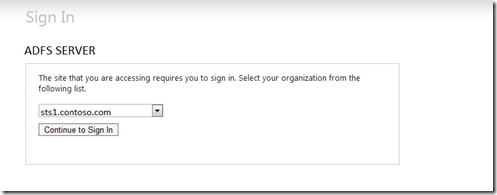
In situation where you have multiple Claims Providers the HomeRealDiscovery.aspx page may confuse users.
As you can see here I have created a second claims provider called test. User may not know which one to use.

FIX 1 – Well not really a fix as much as a way to reduce this issue.
One way to help with this confusion is by setting the persistIdentityProviderInformation enabled value to true and the lifetimeInDays value to something like 30 in the web.config located at C:\inetpub\adfs\ls. This will allow users to only have to select their claim provider every 30 days.

FIX 2 – Update your web application to allow for WHR parameter
Another way to allows users to divert the HomeRealDiscovery page is by adding functionality to your web application that allows the whr parameter to determine which claim provider will be used when doing the redirect to ADFS. Again this code all goes into your web application and does not require any additional work on the ADFS website.
Add a reference to the Microsoft.IdentityModel in your web application

If you don’t already have a Global.asax file in your web application add a new item and select Global Application Class.
You will need to add an additional handler to the code behind of the Global.asax file.

void WSFederationAuthenticationModule_RedirectingToIdentityProvider(object sender, RedirectingToIdentityProviderEventArgs e)
{
e.SignInRequestMessage.HomeRealm = Request["whr"];}
What’s great is that the Identity Model already knows what to do with this method, there is no more code to write.
Now just add the ?whr=identityID parameter to your applications url and you will no longer see the HomeRealDiscovery page but be automatically directed to the authentication method.
Let’s look at two example of how to use this. For both of these my web application will be located at:
My STS (ADFS) server will be located at:
EXAMPLE 1: Using the build in Active Directory Claims Provider
-First we will need to get the entityID of our claims provider. To get this we will go to the FederationMetadata on the STS (ADFS) server at the following url:
https://sts.contoso.com/FederationMetadata/2007-06/FederationMetadata.xml
NOTE: Depending on your IE Version this page may come up blank. If you do not see the XML on the page hit the compatibility view button in IE.
