While coming up with deployment scripts i was tasked to ensure that the Dynamics Global Search had specific entities selected. By utilizing one the undocumented SDK message i was able to set this data. (list of undocumented messages)
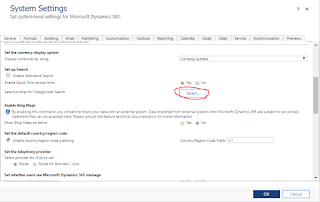
The manual way of updating these settings
- Navigate to Settings -> Administration -> System Settings
- Click on the button for Select entities for categories search
- Add/Remove the entities you want utilizing the selection screen.

How to do it utilizing code:
var request = new OrganizationRequest("SaveEntityGroupConfiguration");

//create a new QuickFindCofigurationCollection
var qfCollection = new QuickFindConfigurationCollection();

//add the entities you want to include in Global Search
qfCollection.Add(new QuickFindConfiguration("contact"));
qfCollection.Add(new QuickFindConfiguration("incident"));

//set the parameters for the request.  It took several hours and digging through the
//CRM Sdk dlls to find the EntityGroupName for this.
request.Parameters["EntityGroupName"] = "Mobile Client Search";
request.Parameters["EntityGroupConfiguration"] = qfCollection;

var response = _serviceProxy.Execute(request);