With really long title on CRM ribbon buttons the text will fill the entire space before going to the next line. In order to for text to the next line you can use the Zero Width Space. Encoded these characters look like this.
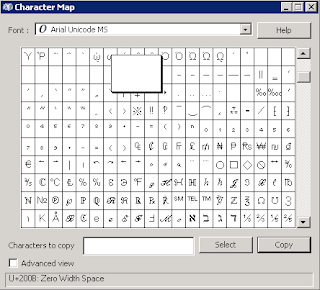
​In order to actually enter these characters into a text editor the easier way is the use the charmap.exe utility in windows.
NOTE: If using Windows Server 2008 ensure the Desktop Experience feature installed or the Charmap will not be available.
-
Start->Run->charmap
-
Change the font to Arial Unicode MS
-
Scroll down about 1/6 of the way down and you will see the space characters.
-
Click on the characters until you see that U+200B is selected at the bottom of the screen.
-
Click Select
-
Click Copy