Posts

Showing posts with the label Authentication

Syncing Azure DevOps Work Item Status to Microsoft Dataverse with Dataflows

Image
In today’s fast-paced development environments, seamless integration between customer and development tracking systems can be crucial for maintaining transparency, efficiency, and alignment across teams. Our objective centers around a scenario faced by some organizations: synchronizing customer requirements captured by staff in Microsoft Dataverse with the development work tracked in Azure DevOps (ADO) . Business Case and Goals Our service teams interact with customers to capture requirements, which are then stored in Microsoft Dataverse. As development plans are formulated, corresponding ADO items are created for each requirement. The primary goals of our integration efforts are: Visibility for Service Staff: Enable service teams to view the status of the ADO items associated with customer requirements directly within Dataverse. This integration aims to eliminate the need for service staff to navigate away from their primary system to check development progress, fostering a mor...
SharePoint Documents Grid Error in Dynamics CRM

After setting up Server based authentication between SharePoint and Dynamics on several instances we were having issues on certain instances where users would attempt to access the Document grid within CRM and would receive the following error "You don't have permissions to view files in this location. Contact your Microsoft OneDrive owner or SharePoint administrator for access."  The grid ribbon buttons still loaded and if we clicked on the Open Location button SharePoint would open with all the files displaying which told us that the user had the required permissions. After troubleshooting with a Microsoft tech for a few hours we concluded that the fix was populating the SharePoint Email Address field on the User record for each user within CRM.  Another important thing to note here is that we were using Azure AD account which had an account name of rick@ad.test.com but the email address was rick@test.com (no ad in the domain name).  I had previously found the article...

Publishing CRM Using WAP, AD FS and DoD PKI

Image
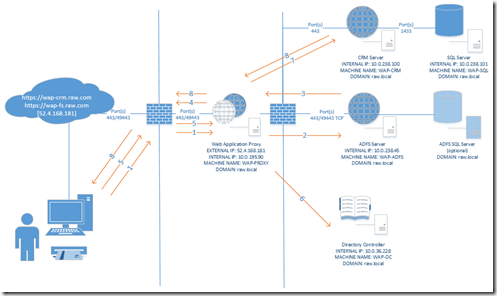
With TMG going the way of the dodo Microsoft has moved much of it's functionality into Server 2012R2.  This includes publishing applications utilizing Windows Authentication and Kerberos Constrained Delegation (KCD).  This is done through a combination of a feature called Web Application Proxy and ADFS 3.0. Requirements Windows Server 2012R2 The Web Application Proxy server should be joined to the domain in order to pass KCD tickets.  The WAP server actually can be in another domain but it would require additional setup not covered in this article. The External DNS of CRM should point to the WAP server. WAP server will need two virtual or physical network cards.  One for external communications and one for internal. The Federation Service URL cannot match the machine name of the AD FS server. Example Configuration This diagram represents the configuration for our sample environment. Additional setup scenarios for load balancing the WAP and CRM server are pos...