Posts

Showing posts with the label Ribbon

Enable the Export to PDF Ribbon Button

Image
Dataverse allows you to easily generate your Word Templates as PDF files . Last year they expanded the functionality beyone just the out of the box sales entities to all custom entities. In order to enable the functionality though you need to do some configuration. Below are the different methods in which you can turn the PDF generation on or off for entities. Note : Aftert updating these settings in whatever manor make sure you clear your browser data . The ribbon stores the values for which entities are enabled and disabled within the browser session. If you don’t do this you may not see the PDF generation buttons show up after you enable them. Method 1 (Sales Hub Installed): For those orgs that have the Sales Hub app this is fairly straightforward. Navigate to the Apps page for your organization https://<Your Org>.crm.dynamics.com/apps Open the Sales Hub app Navigate to the App settings Area in the sitemap and click on Overview under the General group. Microsoft ...
Navigate to the Document Associate Grid View From Record

This will allow you to navigate to the Documents Associated Grid view form a button in the main records ribbon.  This currently works for Dynamics 9.0 and 9.1 Online.  Some of the previous versions used navDocument instead of navSPDocuments. -Create a new ribbon button called DOCUMENTS -Create a WebResource with a javascript function, something like this function navigateToSharePointDocuments() { Xrm.Page.ui.navigation.items.get("navSPDocuments").setFocus();   }; -From the new button call the javascript function.

Force Line Break in CRM 2011 Ribbon Labels

Image
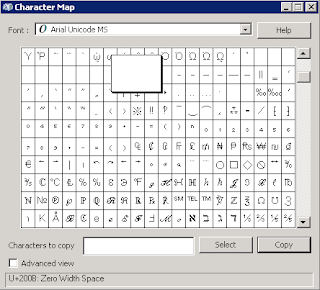
With really long title on CRM ribbon buttons the text will fill the entire space before going to the next line.  In order to for text to the next line you can use the Zero Width Space.  Encoded these characters look like this. &#x200b; In order to actually enter these characters into a text editor the easier way is the use the charmap.exe utility in windows. NOTE : If using Windows Server 2008 ensure the Desktop Experience feature installed or the Charmap will not be available. 1. Start->Run->charmap 2. Change the font to Arial Unicode MS 3. Scroll down about 1/6 of the way down and you will see the space characters. 4. Click on the characters until you see that U+200B is selected at the bottom of the screen. 5. Click Select 6. Click Copy

Xrm.Page.ui Not Available on Primary Grid

Image
  While developing an EnableRule for some new functionality I decided to use an Async call.  Here is a great link on how to use Async calls with EnableRule. http://myencounterwithcrm.wordpress.com/2011/06/09/walkthrough-of-asynchronous-call-from-customrule-ribbondiff/ Microsoft even notes this strategy in the SDK documentation:  Consider that Microsoft sees this as the “proper way” to do things you might think that they would provide the necessary methods to complete this, that would only be half correct. All of this works if you are on an entity form because Xrm.Page.ui.refreshRibbon() is available.  Unfortunately if you are in a grid such as the one displayed below, Xrm.Page.ui is null, which means you cannot call the refreshRibbon() method. DAGGER!!!!!! If anyone knows a way in which to get around this please leave a comment

CustomRule - Just one at a time please.

When you define a CommandDefinition in the CRM 2011 and you want to use a CustomRule underneath an EnableRule just remember that your CustomRule will never fire if you have other EnableRules applied to that Command Definition.  This means that you can't use a bunch of the already build in EnableRules on top of your CustomRule.... which sucks.  Instead you need to re-create the functionality in your CustomRule javascript. For example you can't just use the Mscrm.SelectionCountExactlyOne rule to determine if there is only one record selected in a grid.  Instead you have to do the following; Pass in the CrmParameter called SelectedControlSelectedItemCount and then check to make sure that parameter equals one in your JS code. I really don't like the ribbon schema.  It's confusing and the rules that apply to buttons you create don't always seem to apply to the ones that come out of the box, which makes it extremely hard to troubleshoot sometimes just using the output ...

CRM 2011 Ribbon XML Tips

SharePoint 2010 uses the same ribbon xml schema and there are a lot of resources which are also applicable to CRM 2011. So if a google search using 'CRM 2011 Ribbon' doesn't work try 'SharePoint 2010 Ribbon'. In order to determine sequence numbers you first need to determine the sequence of items currently on the form. You can do this using a tool in the SDK which will allow you do download the ribbon definitions for all of the entities. C:\CRM SDK RC\samplecode\cs\client\ribbon\exportribbonxml\  NOTE:If you have Many to Many relationships within your custom entities make sure to update the SDK ExportRibbonXML utility to look enture the IsIntersect property is false or the export will fail. //<snippetExportRibbonXml5> //Check for custom entities RetrieveAllEntitiesRequest raer = new RetrieveAllEntitiesRequest() {EntityFilters = EntityFilters.Entity}; RetrieveAllEntitiesResponse resp = (RetrieveAllEntitiesResponse)_serviceProxy.Execute(raer); fo...